

Address Guard vs Address Ninja
Two different approaches to address validation. Address Ninja offers a flat $4.99/month for format checks. Address Guard charges $0.05 per order for carrier-grade validation with full automation. The right choice depends on your order volume and what you need from validation.
Feature
- Pricing model
- Cost at 50 orders/mo
- Cost at 125 orders/mo
- Cost at 500 orders/mo
- Cost at 1,000 orders/mo
- Validation method
- Carrier validation (UPS/FedEx/DHL)
- Countries supported
- Rules engine (15+ rules)
- Workflow automation
- Auto-hold orders
- Customer notifications
- Email validation
- Phone validation
- Express checkout support
- Shopify Plus required

- $0.05/order (pay per use)
- $2.50
- $6.25 (breakeven)
- $25.00
- $50.00
- Carrier + postal databases
- .
- 240+
- .
- .
- .
- .
- ($0.01/check)
- ($0.03/check)
- .
- No (post-checkout on all plans)

- $4.99/month (flat rate)
- $4.99
- $4.99 (breakeven)
- $4.99
- $4.99
- Format checks (no validation)
- .
- US focus
- Basic blocking only
- .
- .
- .
- .
- .
- .
- No

The Pricing Breakeven: 125 Orders
Address Ninja charges a flat $4.99 per month regardless of order volume. Address Guard charges $0.05 per order with no monthly fee. The breakeven point is simple math: $4.99 ÷ $0.05 = approximately 100 orders.
Below 100 orders per month: Address Ninja costs less. At 50 orders, you pay $4.99 vs $2.50 for Address Guard. Address Ninja provides format checks at this tier.
Above 100 orders per month: Address Guard costs more in absolute terms, but you get carrier-grade validation, a rules engine, workflow automation, and 240+ country coverage. At 500 orders, you pay $25/month for Address Guard vs $4.99 for Ninja, and Address Guard provides deeper validation that confirms actual deliverability.
The real question is not which is cheaper. It is whether format checking is sufficient, or whether you need carrier validation to prevent failed deliveries. A single prevented FedEx correction fee ($18) covers 360 Address Guard validations.
- Breakeven at ~125 orders per month
- Below 125: Ninja costs less with format checks
- Above 125: Address Guard costs more but validates deeper
- One prevented correction fee pays for 450 validations
Carrier Validation vs Format Checks
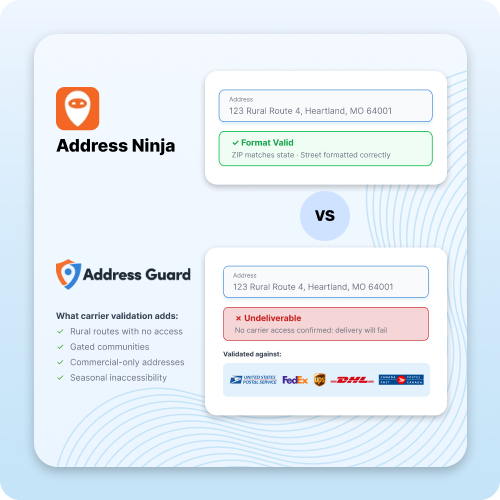
Address Ninja performs address format checks: does the ZIP code match the city, is the street name formatted correctly, does the state abbreviation exist. These checks catch typos and obvious errors.
Address Guard validates against actual carrier databases. USPS, UPS, FedEx, DHL, Canada Post, Royal Mail, and Australia Post. This means the system confirms not just that an address is formatted correctly, but that a carrier can actually deliver a package there.
The difference matters when an address looks correct but is undeliverable. Rural routes with seasonal access, gated communities without carrier access codes, commercial addresses that do not accept residential deliveries. These pass format checks but fail carrier validation.
- Format checks catch typos and formatting errors
- Carrier validation confirms deliverability
- AI parsing handles non-standard formats
- Prevents $10-18 correction fees per failed delivery

Rules Engine: 15+ Rules vs Basic Blocking
Address Ninja offers address blocking: you can block PO boxes and flag certain address types. Address Guard provides a configurable rules engine with 15+ rules that enforce your shipping policies automatically.
With Address Guard, you can block PO boxes, require apartment numbers for multi-unit buildings, flag military addresses (APO/FPO/DPO), reject non-Latin characters, restrict shipments to specific countries or regions, require phone numbers for international orders, and more.
Each rule is independently configurable. Turn them on or off based on your shipping policies, and the system enforces them without manual review.
- PO box blocking
- Apartment number requirement
- Military address flagging (APO/FPO)
- Non-Latin character rejection
- Country and region restrictions
- Phone number requirements for international
240+ Countries vs US Focus
Address Ninja focuses primarily on US addresses. If you ship internationally, you need validation that handles the address formats, postal codes, and carrier rules for each destination country.
Address Guard validates addresses across 240+ countries with support for 9 languages. The AI parsing engine handles non-standard international formats that trip up format-based validation tools: addresses without postal codes, reversed name orders, addresses in non-Latin scripts, and country-specific formatting conventions.
- 240+ countries validated
- 9 languages supported
- AI parsing for non-standard formats
- Country-specific postal rules
- Non-Latin character support

Rules Engine: 15+ Rules vs Basic Blocking
Address Ninja offers address blocking: you can block PO boxes and flag certain address types. Address Guard provides a configurable rules engine with 15+ rules that enforce your shipping policies automatically.
With Address Guard, you can block PO boxes, require apartment numbers for multi-unit buildings, flag military addresses (APO/FPO/DPO), reject non-Latin characters, restrict shipments to specific countries or regions, require phone numbers for international orders, and more.
Each rule is independently configurable. Turn them on or off based on your shipping policies, and the system enforces them without manual review.
- PO box blocking
- Apartment number requirement
- Military address flagging (APO/FPO)
- Non-Latin character rejection
- Country and region restrictions
- Phone number requirements for international

Inkbox
“Super happy I found this app! Our undeliverable addresses and associated labor have dropped by 40% since starting to use Address Guard!”
Yaniv Logistics Manager test

Xena Workwear
“Address Guard works like a charm and the support is TRULY fantastic. The founder is responsive and a fast implementor of upgrades. I would say that this is the best support I’ve ever experienced with a 3rd party app, hands down.”
Dmitry Chief Operations Officer

Sunday Swagger
“The integration process and support from Address Guard has been nothing but Outstanding!! The solution has performed exactly as expected and had offered a significant improvement to our deliverability.”
Gary Chief Operations Manager
Frequently Asked Questions
How do I add address autocomplete to my Shopify checkout?
For Shopify Plus stores, Address Guard provides native Checkout Extensions that add address autocomplete directly in the checkout flow. Setup takes about 1 minute through the Shopify admin. For standard Shopify stores, address autocomplete is available on the thank-you page. Both options validate against carrier databases in 240+ countries.
What is the difference between address autocomplete and address validation?
Address autocomplete suggests addresses as customers type, reducing form completion time by 70-80% and preventing typos. Address validation checks the final submitted address against postal and carrier databases to confirm it is real and deliverable. Address Guard offers both – autocomplete at checkout and validation post-checkout.
Does Shopify have built-in address autocomplete?
Shopify provides basic address suggestions through Google Maps and its Address Autocomplete API for Plus stores, but these are lookup tools, not carrier-validated verification. They do not check addresses against UPS, FedEx, or DHL databases, do not flag PO boxes or missing apartment numbers, and do not enforce shipping rules. Address Guard adds carrier-grade validation and a rules engine on top of autocomplete.
Does address autocomplete work with Apple Pay and Google Pay on Shopify?
Express checkout methods like Apple Pay and Google Pay bypass the standard checkout form, which means address autocomplete does not apply to those flows. However, Address Guard’s post-checkout validation still checks addresses submitted through express checkout, catching errors before fulfillment.
Try Address Guard for Free
Try Address Guard for Free
100 free validations. No credit card required. See the difference carrier-grade validation makes for your store.