

CARRIER-VALIDATED VERIFICATION
Automate Your Address Correction Workflow
Stop manually reviewing flagged orders. Address Guard validates every address, holds problematic orders, notifies customers, and syncs corrections back to your platform — automatically.
70%
REDUCTION IN CARRIER FEES
32%
FEWER SUPPORT TICKETS
10x
ROI
How It Works
From order placed to address corrected — fully automated, no manual intervention required.
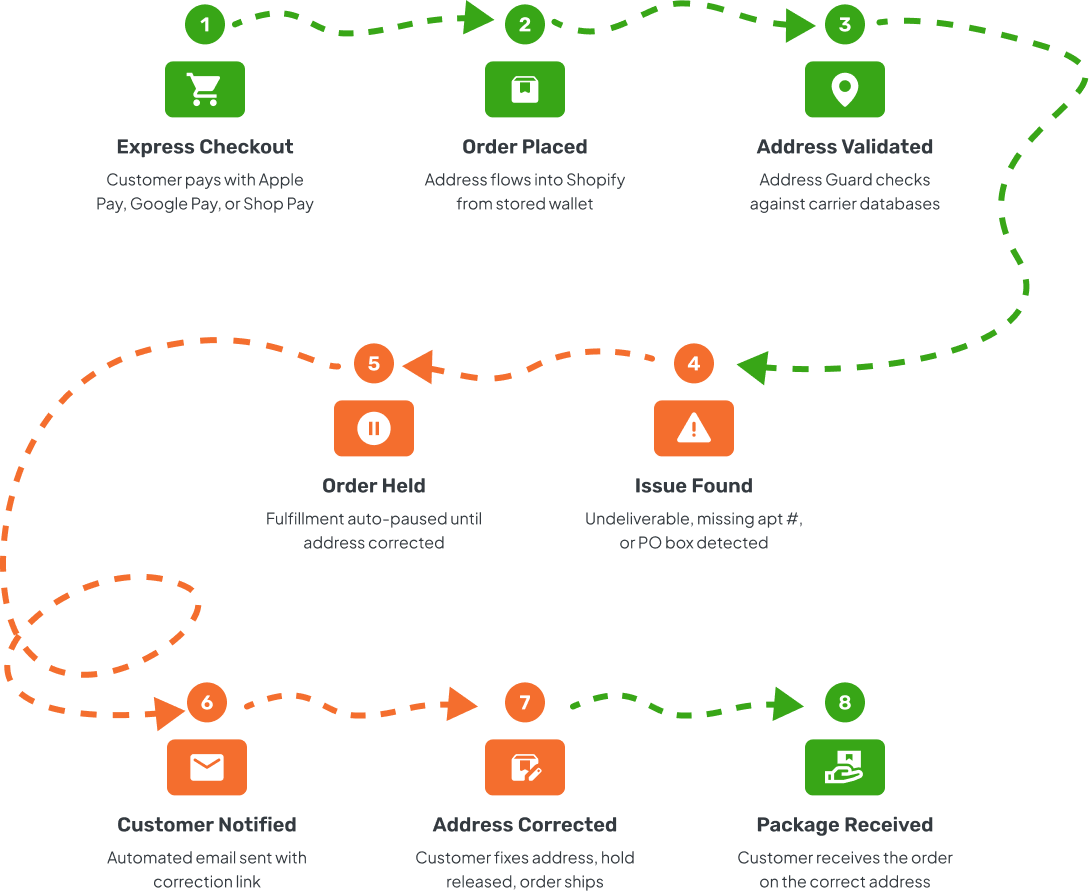

Hold Fulfillment Automatically
When Address Guard detects an unverifiable or problematic address, it automatically places a fulfillment hold on the order. No bad address reaches your shipping team.
Configure hold logic based on validation results: hold all unverifiable addresses, only undeliverable ones, or orders that violate your shipping rules (PO boxes, missing apartment numbers, military addresses).
- Auto-hold based on validation result or rule violation
- Manual release option for edge cases
- Hold analytics -- track how many orders are held and why
- Tag orders with hold reason for fulfillment team visibility
- Configurable hold conditions per shipping rule
Customer Notifications That Get Results
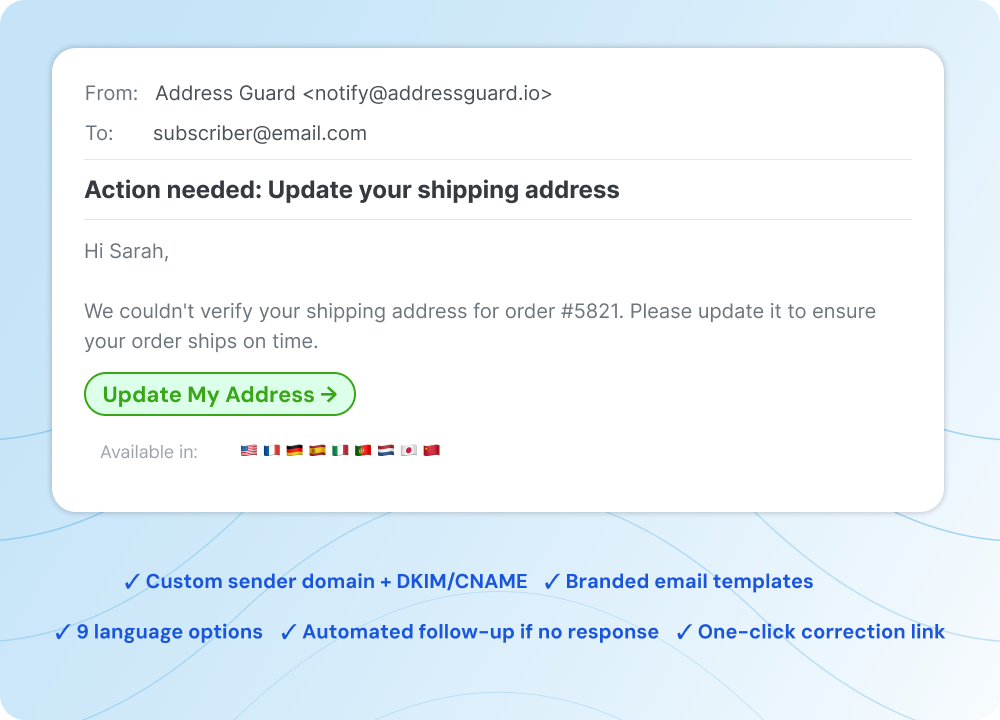
Address Guard sends automated emails to customers when their address has an issue. Each email includes a secure link where the customer can review and correct their shipping address.
Emails are sent from your custom sender domain with full DKIM/CNAME authentication — they look like they come from your brand, not a third party. Available in 9 languages with branded templates.
- Custom sender domain with DKIM/CNAME authentication
- Branded email templates matching your store
- 9 language options for international customers
- One-click correction link for customers
- Automated follow-up if no response
Corrections Sync Back Automatically
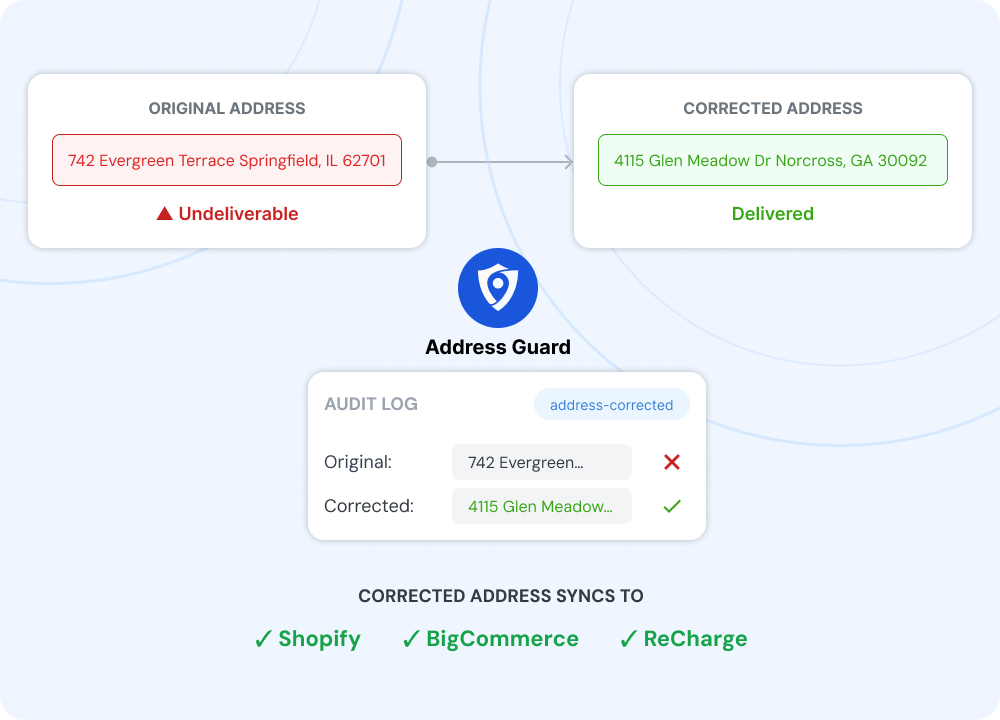
When a customer corrects their address, Address Guard syncs the updated address back to your e-commerce platform automatically. No copy-pasting. No manual order edits.
Syncing works with Shopify, BigCommerce, and ReCharge. The fulfillment hold is released once the corrected address is synced, and the order flows to your shipping team with a verified address.
- Auto-sync to Shopify, BigCommerce, and ReCharge
- Fulfillment hold released on sync
- Original and corrected addresses logged for audit
- Order tagged with correction type
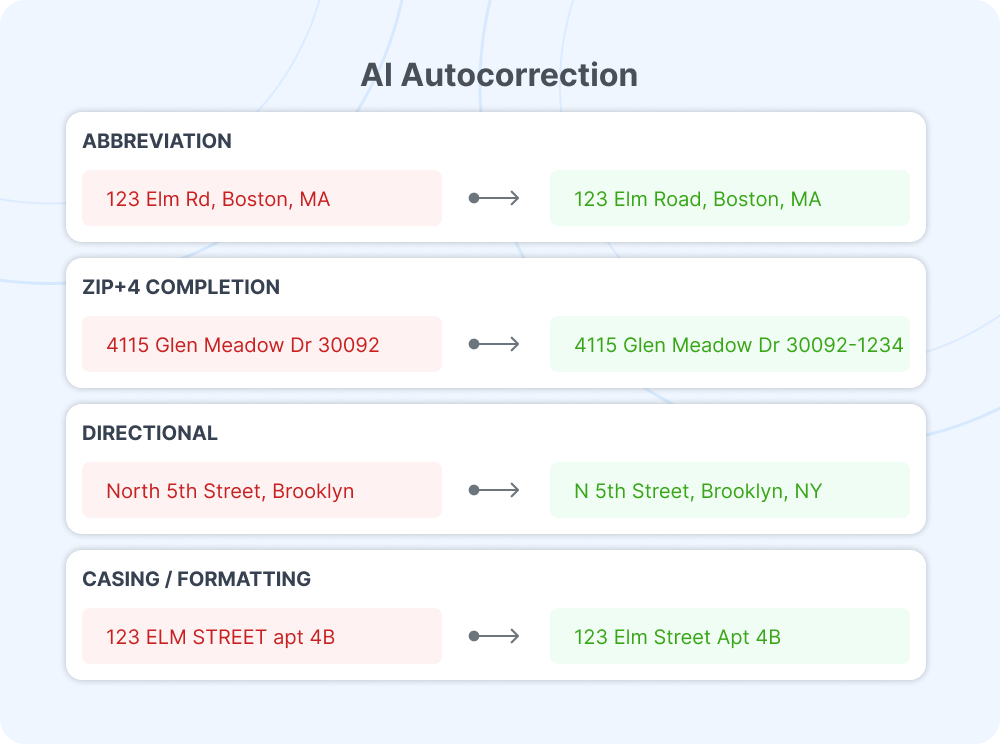
AI Autocorrection for Minor Issues
When a customer corrects their address, Address Guard syncs the updated address back to your e-commerce platform automatically. No copy-pasting. No manual order edits.
Syncing works with Shopify, BigCommerce, and ReCharge. The fulfillment hold is released once the corrected address is synced, and the order flows to your shipping team with a verified address.
- Auto-sync to Shopify, BigCommerce, and ReCharge
- Fulfillment hold released on sync
- Original and corrected addresses logged for audit
- Order tagged with correction type
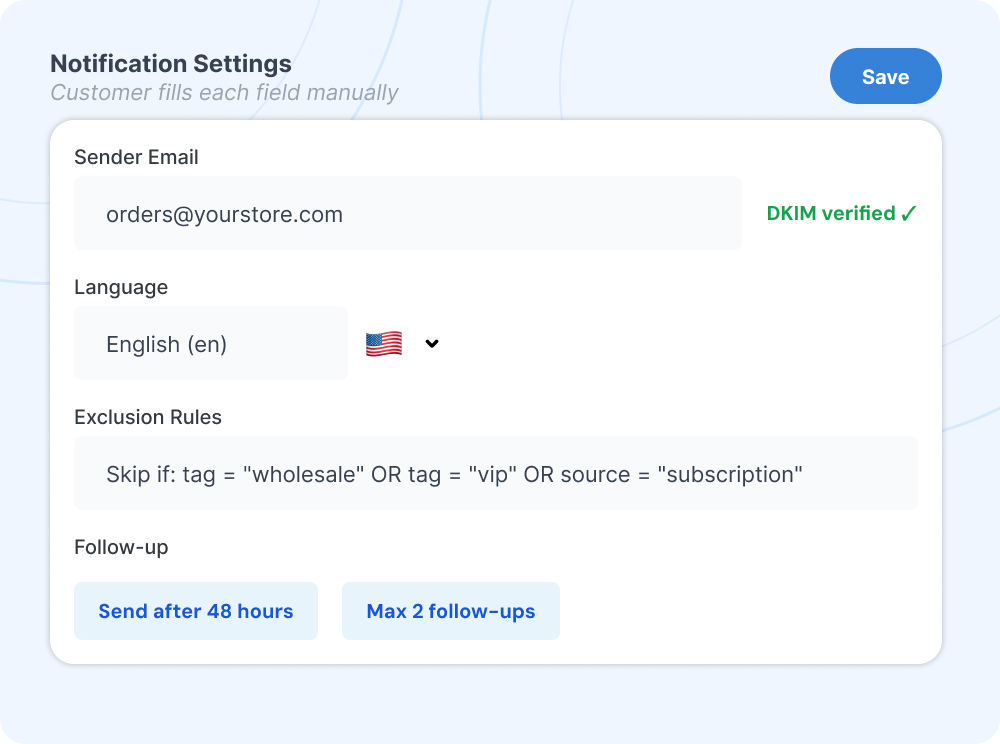
Full Notification Customization
Control every aspect of your customer-facing notifications. Set the sender email, customize the template, choose the language, and define rules for when notifications are sent.
Exclude specific order types, tags, or customer segments from notifications. Set up rules-based exclusions so wholesale orders, subscription renewals, or VIP customers get handled differently.
- Custom sender email and domain
- Editable email templates
- 9 language options
- Rules-based notification exclusions
- Follow-up timing configuration
Why Automate Address Corrections?
Manual address review doesn’t scale. Here’s what automation delivers.
Reduce Carrier Fees
70% reduction in carrier address correction fees. At $25.50 per FedEx correction, the savings add up fast.
Fewer Support Tickets
32% fewer "where's my order?" tickets. Customers get notified before there's a problem, not after.
Faster Fulfillment
No more pausing fulfillment to manually review flagged addresses. Clean orders ship immediately. Flagged orders resolve themselves.
Better Customer Experience
Customers appreciate a proactive "we noticed an issue" email far more than a "your package was returned" notification.
Complete Visibility
Every validation, hold, notification, and correction is logged. Full audit trail for operations and customer service teams.
Dead Simple Setup
Install the app, configure your rules, and the automation runs. No code changes. No complex integrations. Works in minutes.

Inkbox
“Super happy I found this app! Our undeliverable addresses and associated labor have dropped by 40% since starting to use Address Guard!”
Yaniv Logistics Manager test

Xena Workwear
“Address Guard works like a charm and the support is TRULY fantastic. The founder is responsive and a fast implementor of upgrades. I would say that this is the best support I’ve ever experienced with a 3rd party app, hands down.”
Dmitry Chief Operations Officer

Sunday Swagger
“The integration process and support from Address Guard has been nothing but Outstanding!! The solution has performed exactly as expected and had offered a significant improvement to our deliverability.”
Gary Chief Operations Manager
Frequently Asked Questions
How long does it take to set up the automated workflow?
Can I customize which orders get held and which don't?
What if a customer doesn't respond to the notification email?
Address Guard can send automated follow-up emails after a configurable delay. If the customer still doesn’t respond, the order remains held and your team can choose to release it manually, cancel it, or reach out directly. You always maintain control.
Stop Shipping to Stale Addresses
Stop Shipping to Stale Addresses
Start with 100 free validations. Catch address issues before your next subscription renewal cycle.